How to Choose the Right Practice Management Software for Your Clinic
Most clinics don't realize their practice management software is holding them back until the friction becomes undeniable. Scheduling starts taking longer than it should. Billing errors surface after the fact. Reports don't reflect what's actually happening in the practice. The gap between what the system does and what the clinic actually needs widens slowly, then all at once.
If you're at that point, or actively trying to avoid it, this is the guide to work through before you request a single demo. Understanding how to choose practice management software correctly starts with the right questions, not the right feature list. We'll cover the mistakes worth avoiding, the practice management software features that genuinely matter, how to match a platform to your clinic's specific situation, and what the cost of practice management software actually looks like when you account for the full picture.
Your Clinic Deserves Better Software
Common Mistakes When Selecting Practice Management Software
The software selection process tends to go sideways in predictable ways, and knowing what they are saves you from months of frustration.
Prioritizing price over fit
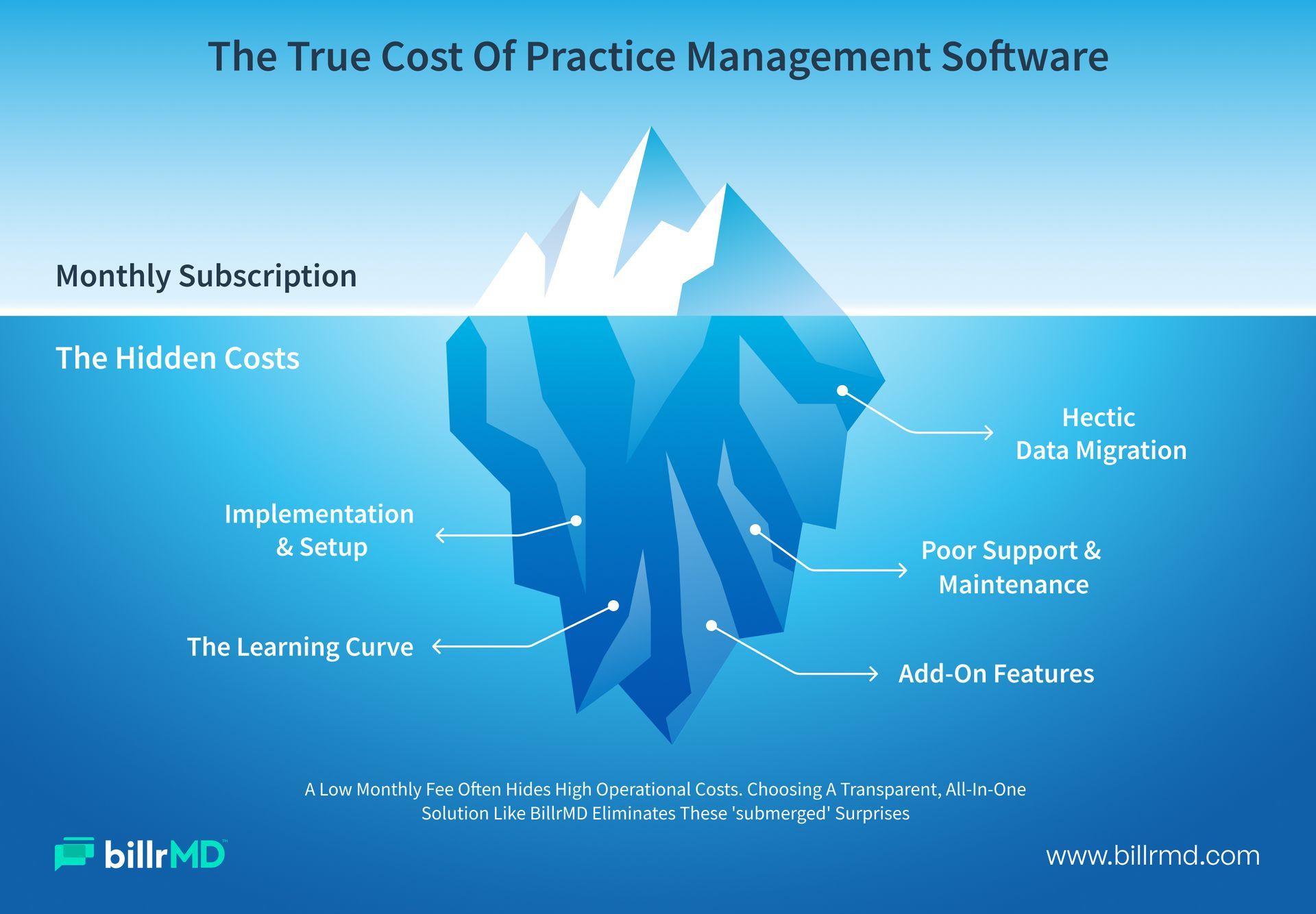
A low monthly rate only makes sense if the platform handles your actual workflows. Software that seems affordable on paper but creates bottlenecks at the front desk or in billing isn't saving you anything. It's costing you staff time and lost revenue you may never be able to trace back to the source.
Evaluating demos instead of real scenarios
Vendors give scripted, polished demos. What you need to see is how the system handles your specific situations: a scheduling conflict between two providers, an insurance eligibility check run the same day, a denied claim that requires appeal documentation. If the evaluation doesn't include your actual use cases, it isn't really an evaluation.
Underestimating implementation
A capable platform with poor onboarding still creates months of disruption. Ask every vendor about training timelines, data migration support, and what the first 90 days of support look like. Transition friction is a real cost, and it's one most buyers don't account for upfront.
Not thinking past today
What works for two providers now needs to work for five providers in two years. Software that fits your current footprint but can't scale isn't a bargain. It's a deadline.
Practice Management Software Features That Actually Matter
Not every feature in the brochure earns its place in your daily workflow. These are the practice management software features that have a direct impact on how your clinic operates.
Scheduling
This is the operational heartbeat of any clinic. A good scheduling module tracks provider availability, prevents conflicts, and lets your front desk manage high patient volume without juggling multiple tools. billrMD's
scheduling module is built for exactly this, keeping your calendar organized and your appointment gaps to a minimum.
Automated appointment reminders
No-shows are expensive, and most of them are preventable.
Automated appointment reminders via text and email reduce cancellations and keep your schedule filled without requiring staff to make calls. The better systems let you customize message content and timing based on appointment type.
Real-time insurance eligibility verification
Discovering that a patient's coverage lapsed after the appointment creates billing headaches that are entirely avoidable. Eligibility verification built directly into your workflow removes that risk before the visit happens.
Integrated claims management and billing
Practice management software systems that handle billing alongside scheduling and patient management give you a more complete picture of your financial performance. Look for built-in claims scrubbing, electronic claims submission, and ERA-powered automated payment posting rather than manual data entry between disconnected systems.
Reporting and analytics
A platform without strong reporting obscures how your practice is actually performing. You need real-time visibility into A/R aging, denial trends, payer performance, and collection rates, without building custom exports in a spreadsheet. billrMD's
reports and analytics tools surface exactly this from a single dashboard.
HIPAA-compliant access controls
Role-based permissions keep patient data secure while allowing each staff member to access only what they need to do their job. billrMD's user accounts feature lets you manage this at a granular level, so access is always appropriate, never excessive.
For a thorough breakdown of every feature worth evaluating,
What to Look for in a Practice Management System: Full Feature Guide goes into full depth.
How to Choose the Right Practice Management Software
There's no single answer to how to choose practice management software that applies equally to every clinic. The right approach depends on three things: your practice type and size, your workflow structure, and your total cost tolerance. Working through each one separately takes most of the guesswork out of the decision.
By Practice Type and Size
Solo providers and small practices need software that's easy to deploy, doesn't require a dedicated IT person, and covers the core functions without excessive configuration overhead. When choosing practice management software for small clinic operations, the priority is a system your team can learn quickly and use confidently without frequent vendor intervention. A web-based platform requires no local installation or server maintenance, making it a practical starting point for lean teams.
Multi-provider and group practices have more complex scheduling structures, more payer relationships to manage, and typically higher billing volume. For these practices, the evaluation criteria shift toward integration quality, reporting depth, and the ability to support multiple users with clearly differentiated roles and permissions.
Multi-location practices need all of the above, plus consolidated visibility across locations from a single dashboard. Cloud-based practice management software systems are far more practical here than on-premise solutions, since your team can access the same data from any location without VPNs, server dependencies, or IT support calls.
By Workflow Fit
This is where the actual evaluation happens. Map your core workflows before you open a single demo: How does a new patient get scheduled, verified, and billed? Where do handoffs happen between your front desk, clinical staff, and billing team? What breaks down most consistently?
A solid, comprehensive guide to selecting practice management software: the clinic workflows approach means matching the platform's features to your process, not the other way around. If you find yourself building workarounds to make a system fit your clinic, that's a reliable sign the system wasn't designed for your type of practice.
For a look at the operational pressure points independent clinics run into most often,
8 Common Independent Medical Practice Challenges and How To Solve Them is worth a read before you finalize your criteria.
By Cost and Vendor Support
Understanding the cost of practice management software goes beyond the monthly subscription rate. Ask vendors about setup fees, per-claim charges, training costs, and what's included in the standard support plan. Some platforms look affordable upfront, but add up quickly once you factor in per-transaction fees and paid add-ons that cover functionality you assumed was standard.
For a detailed breakdown of how software pricing structures actually work, What Does Medical Billing Software Really Cost in 2026? covers the full picture clearly.
Beyond pricing, think about support. Responsive vendor support isn't a nice-to-have for a clinic running scheduling and billing in the same system. When something breaks during a busy morning, you need resolution, not a ticket number.
Why billrMD Is the Right Choice for Your Clinic
billrMD is a fully web-based practice management and medical billing platform built to handle the complete operational picture of a modern clinic. Nothing to install. No server to maintain. No version of the software requires IT support to keep running. It runs from any secure browser, so your team can work from the front desk, the back office, or remotely without losing access to the tools they need.
On the scheduling side, billrMD manages provider availability, appointment tracking, and automated patient reminders from a single system. Billing is integrated into the same platform, so your front desk, clinical staff, and billing team are always working from the same data. Claims go through a scrubbing engine that checks every submission against more than 73,000 ICD-10, CPT, and DSM-5 codes before it leaves the system, which supports billrMD's 99% first-pass acceptance rate.
The reporting tools give you real-time visibility into payer performance, A/R aging, provider-level collections, and denial patterns that may be costing you more than you realize. The platform supports medical practices, billing companies, labs, and IDTFs, and it's designed to work whether your billing is handled in-house or through an external billing partner, without requiring a system change if your model shifts.
To see the full operational case for what a unified platform delivers, The Real Benefits of Practice Management Software for Clinics lays it out clearly.
Conclusion
Knowing how to choose practice management software comes down to having clear criteria before you start comparing platforms. Define where your workflows break down, evaluate practice management software features against those specific gaps, and understand the total cost of practice management software, not just the monthly rate. The right system makes your team more efficient, provides financial visibility, reduces administrative errors, and scales with you as your practice grows.
billrMD is built to do all of that in one platform. If you're ready to see how it fits your clinic, the next step is simple.
The Right Software Changes Everything
Frequently Asked Questions
How much does practice management software typically cost?
The cost of practice management software varies significantly by vendor, practice size, and pricing model. Some platforms charge a flat monthly subscription fee, while others add per-claim fees, setup costs, and add-on charges that can substantially increase the actual total. Understanding the full fee structure before committing matters. billrMD offers pricing based on your practice's actual needs, which you can explore at billrmd.com/company/pricing-form.
How do I choose practice management software for a small clinic?
When choosing practice management software for small clinic settings, prioritize ease of use, rapid implementation, and a feature set that meets your core needs without unnecessary complexity. A cloud-based platform that requires no installation and offers responsive support makes a real difference for small teams. Run a demo or trial using your actual workflows, not a scripted scenario, before making a commitment.
Which practice management software features should I evaluate first?
Start with the functions that affect every patient visit: scheduling, eligibility verification, and claims management. From there, evaluate automated reminders to reduce no-shows and reporting tools that give you real-time financial visibility. Practice management software features worth prioritizing also include HIPAA-compliant access controls and ERA-powered payment posting. What to Look for in a Practice Management System: Full Feature Guide walks through the complete list with practical context.
Can one platform handle both practice management and medical billing?
Yes, and for most clinics, an integrated approach is the better option. When scheduling, billing, and reporting run in the same system, you get fewer data handoffs, a more unified view of your financial performance, and less opportunity for administrative error. billrMD combines practice management and medical billing into a single web-based platform designed specifically to support both functions without separate tools or manual data transfers.
Recent Posts