Signs Your Clinic Needs a New Practice Management System

Most clinics don't realize their practice management system has become a liability until the signs become impossible to dismiss. A scheduling conflict surfaces a few times a week, and staff work around it. Claims go out with errors that take days to catch. Reports need manual cleanup before they're usable. Each friction point feels minor in isolation. Collectively, they signal something that isn't going away on its own.
Practice management systems in healthcare have advanced significantly over the past decade. What passed for capable software a few years ago may not hold up to the demands of a practice running higher patient volumes, a more complex payer mix, and a leaner administrative team today. If your clinic has adapted its workflows to fit an aging platform rather than the other way around, there's a real cost to that arrangement, even if it doesn't appear clearly on any single report.
This post covers the specific warning signs worth taking seriously, what they actually cost your clinic operationally and financially, and how to make a well-informed decision when the evidence points toward something new.
Stop Working Around Your Software
What a Practice Management System Actually Does in Healthcare
Before identifying where the cracks appear, it helps to be clear on what a well-built system is supposed to do. A practice management system handles the administrative and financial infrastructure that supports clinical care: appointment scheduling, insurance eligibility verification, claims submission and tracking, payment posting, and financial reporting. In a properly integrated setup, those functions connect seamlessly. An appointment triggers an eligibility check. A patient encounter feeds a claim. Processed payment posts automatically. The system handles the handoffs; your staff handles the exceptions.
When those connections break down, handoffs become manual, errors multiply at every transfer point, and administrative overhead rises without an obvious source to trace it to.
Warning Signs Your Practice Management System Is Slowing Down Your Clinic
The friction that signals a system has hit its limits tends to appear in predictable patterns. These are the most common and the ones most often dismissed as standard operational challenges rather than software limitations.
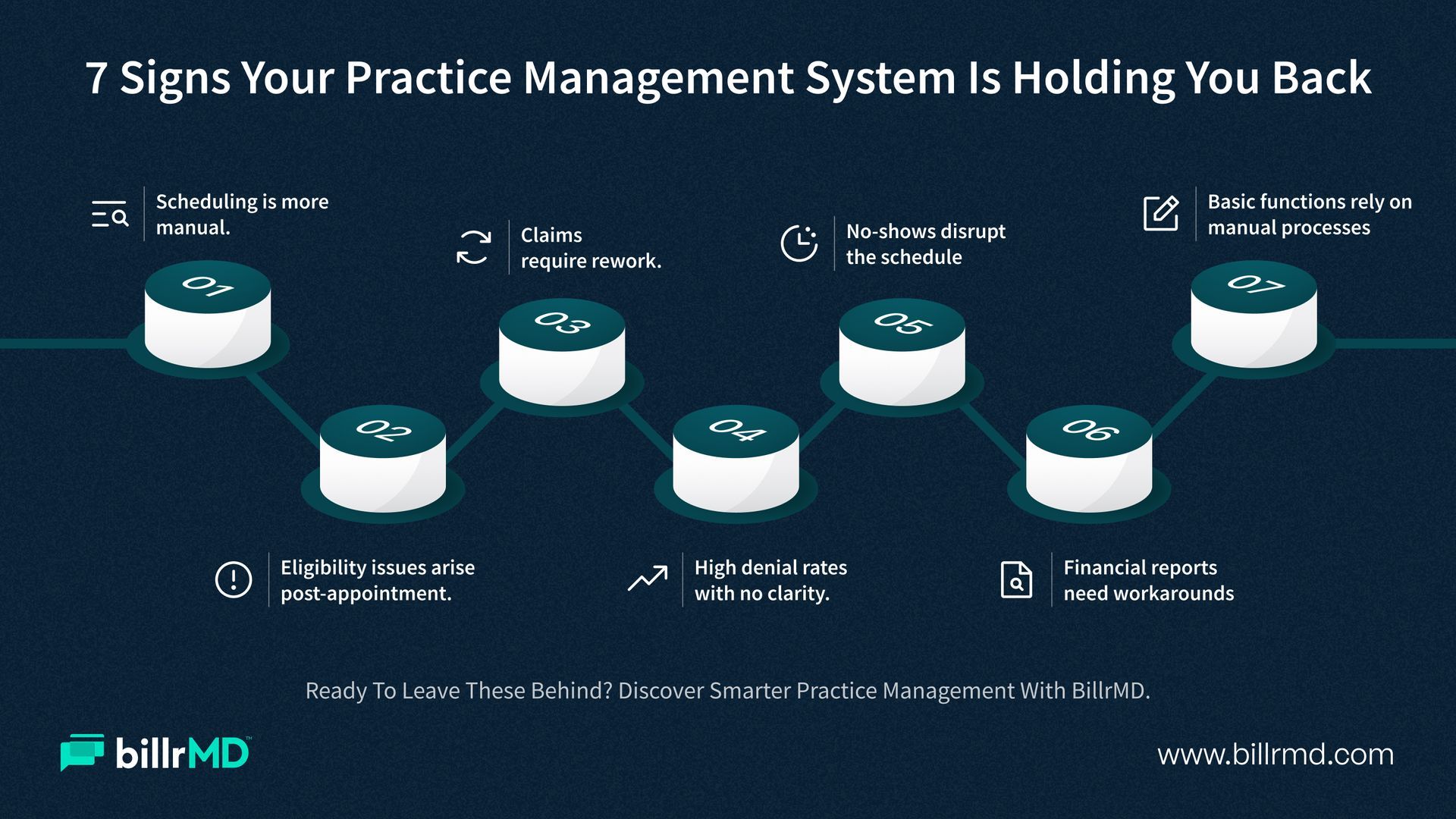
Scheduling requires more manual effort than it should
When your front desk regularly manages scheduling conflicts by cross-referencing separate calendars or manually entering appointment data into billing records, that's not a process problem; it's a system limitation. A capable practice management software manages provider availability rules, automatically prevents double-booking, and feeds scheduling data directly into your eligibility and billing workflows without manual input between steps.
Eligibility issues keep surfacing after the appointment
Coverage that lapses, deductibles your team didn't catch, secondary insurance that wasn't verified: these problems are expensive precisely because they appear after care has already been delivered. If your current system doesn't run eligibility checks in real time before the visit, or if your staff checks coverage through separate payer portals rather than an integrated workflow, you're absorbing an avoidable billing cost every time it happens.
Claims leave your system with errors that your team has to catch
Your practice management system should consistently submit clean claims. If your billing team is regularly correcting missing fields, mismatched codes, or unsupported modifiers before submission, then the platform's claim-scrubbing logic isn't doing its job. For a detailed look at what effective claims management looks like as part of a complete platform, ‘What to Look for in a Practice Management System: Full Feature Guide’ covers every major feature category in practical depth.
Denial rates are high, but the cause isn't clear
A high claim denial rate is a symptom. An inability to see which payers, codes, or submission patterns are driving it is the deeper problem. Your practice management software system should give you the reporting tools to isolate denial trends by payer, code category, and provider, so you can correct the pattern rather than just process its consequences. Without that visibility, the same denials recur month after month.
No-shows are cutting into your schedule with no automated response
Missed appointments represent direct revenue loss and scheduling gaps that could have been filled. If your current system doesn't send automated reminders via text and email, or if reminder management is a manual task layered on top of everything else your staff handles, you're incurring a recurring, largely preventable cost.
Financial reports require workarounds to be useful
If your billing team exports platform data and reformats it in a spreadsheet to answer basic financial questions, your practice management system isn't meeting the minimum standard for reporting. A/R aging by payer, denial trends, provider-level collection rates, and payment summaries should be accessible directly from the platform, without exporting and restructuring. Decisions made from delayed or incomplete financial data aren't as sharp as they need to be.
Your team has built manual workarounds for basic functions
Workarounds are the most reliable indicator that a system was never designed for your workflow, or has outlived it. When staff builds manual processes to compensate for something the software should handle, those workarounds accumulate invisibly. Each one represents institutional time and energy spent maintaining an inadequate tool rather than on work that actually benefits the practice.
What Outdated Practice Management Software Systems Are Costing You
The operational friction described above carries a financial weight that is often underestimated because it doesn't appear on a single line item.
Higher denial rates increase administrative costs per dollar collected because more time is spent on appeals and resubmissions. This also results in slower payment cycles and a higher volume of claims requiring a second or third attempt before payment is received. Staff time spent on manual eligibility checks, claim corrections, and workaround processes is time diverted from higher-value work. Delayed or incomplete reporting means financial problems compound for weeks before anyone identifies them.
The real benefits of practice management software show up precisely in these areas: faster claim turnaround, fewer denials, improved collection rates, and an administrative workload that scales with patient volume rather than against it. An outdated system quietly absorbs those potential gains before they reach your revenue cycle. There's also a harder-to-measure cost in staff adaptation. The longer a clinic operates around a system's limitations, the more normalized those limitations become. Extra steps feel routine. Manual checks become standard procedure. The gap between what's efficient and what's accepted grows wider, and the cost of that gap compounds accordingly.
When the Answer Is a New System, Not Another Workaround
Not every operational problem in a clinic traces back to the software. But there are clear situations where the platform is the constraint, and a new system is the most direct path to meaningful improvement.
If your current practice management system can't accommodate additional providers or a second location without incurring high costs, that's a planning problem worth addressing. You should consider this before your practice grows into it and disrupts workflow. If it requires local server maintenance or IT support to function reliably, a fully web-based alternative removes that overhead entirely. If it wasn't built for your specialty's documentation and coding requirements, a platform with a deeper code library and configurable billing profiles will directly reduce the time your team spends on per-claim setup.
The harder question is how to evaluate replacement options carefully enough to avoid trading one inadequate system for another. How to Choose the Right Practice Management Software for Your Clinic walks through the evaluation criteria, common selection mistakes, and what to look for beyond the vendor demo.
Why billrMD
billrMD is a web-based practice management and medical billing platform designed for modern clinics. Key features include:
- No installations or IT dependencies:
Operates through a secure browser from any location. - Scheduling module:
Manages provider availability, connects appointment data to eligibility and billing, and automates reminders via text and email.
- Role-based access:
Protects PHI while preventing workflow bottlenecks. - Billing efficiency:
Claims scrubbing engine ensures upto 99% acceptance rate, automated payment posting, configurable invoicing, and real-time reporting on A/R aging and denial trends. - Supports in-house or external billing:
Adapts to evolving operational structures.
Conclusion
The signs that a practice management system has reached its limits are usually visible well before a clinic decides to act on them. Scheduling friction, eligibility gaps, high denial rates, inadequate reporting, and staff workarounds don't improve with time. They compound.
The answer to ‘How to improve efficiency in clinical operations’ rarely requires overhauling everything at once. For most clinics, the right practice management software closes the gaps that manual processes and outdated tools have been quietly sustaining, and the operational and financial gains tend to follow quickly once those gaps close.
The Right System Changes Everything
Frequently Asked Questions
What are the biggest challenges facing independent medical practices?
The most common challenges include reimbursement pressure, high claim denial rates, prior authorization delays, insurance eligibility gaps, administrative overload, financial visibility issues, regulatory compliance, and patient collections. These challenges tend to be more acute for independent practices because they operate without the administrative depth that larger health systems rely on.
How do practice management solutions help independent practices?
Medical practice management solutions reduce administrative burden by consolidating scheduling, billing, patient communications, and reporting into a single platform. They automate time-consuming tasks like claim submission and eligibility verification, surface real-time financial data, and reduce the risk of costly coding and billing errors that cost practices revenue every day.
What should independent practices look for in healthcare software?
Look for real-time insurance eligibility verification, clean claim submission with built-in error checking, denial tracking and reporting by code and payer, patient invoicing tools that support multiple delivery methods, and HIPAA compliance. A web-based platform that requires no local installation is especially valuable for practices without dedicated IT support.
Is billrMD suited for small independent practices?
Yes. billrMD is designed to be affordable, scalable, and easy to use without a technical team. There are no downloads, no hardware requirements, and the platform grows with your practice as you add providers, locations, or services over time.
Recent Posts