EHR vs Practice Management Software: What Every Practice Needs to Know

Healthcare administrators and practice owners hear the terms "EHR" and "practice management software" constantly, and they're often used interchangeably. They shouldn't be. These two systems serve different functions, support different users, and handle fundamentally different types of data. Mixing them up in conversation is relatively harmless. Mixing them up when you're evaluating technology for your clinic is not.
Whether you're shopping for a new system, trying to make sense of your current tech stack, or figuring out what's missing from your workflow, understanding the difference between EHR and practice management software is the right place to start. This guide lays it out clearly and practically.
Your Practice, Managed Better
What is Practice Management Software?
Practice management software (PMS) is essential for the smooth operation of a medical practice, managing administrative and financial tasks like patient scheduling, insurance verification, claims submission, and financial reporting. It enables the front desk, billing team, and administrators to work efficiently.
A well-designed PMS enhances workflow, ensuring timely and accurate claims submissions while providing leadership with insights into financial performance. Key features include appointment scheduling with reminders, real-time insurance eligibility checks, electronic claims submission, ERA-powered payment posting, and reporting dashboards for tracking denial rates and collections.
While PMS does not handle clinical functions like documenting diagnoses or treatment plans, it streamlines the operational and financial aspects of a practice, reducing the need for constant manual intervention. For a detailed exploration of its functionalities,
check our blog.
What is an EHR?
An Electronic Health Record (EHR) is a digital system designed to capture and manage clinical information, including a patient’s medical history, examinations, diagnoses, treatment plans, medication lists, lab results, and e-prescriptions. EHRs support clinical decision-making and care continuity, providing a structured record of a patient's health over time.
Unlike practice management software, EHRs are used daily by clinicians, including physicians and nurses. The documentation burden is significant; physicians spend about
13 hours weekly on indirect patient care activities. Studies indicate that even when appointment volumes decrease, time spent on EHRs declines only modestly, highlighting the documentation-intensive nature of these systems, which reflect the clinical complexity they aim to organize.
EHR vs Practice Management Software: Key Differences
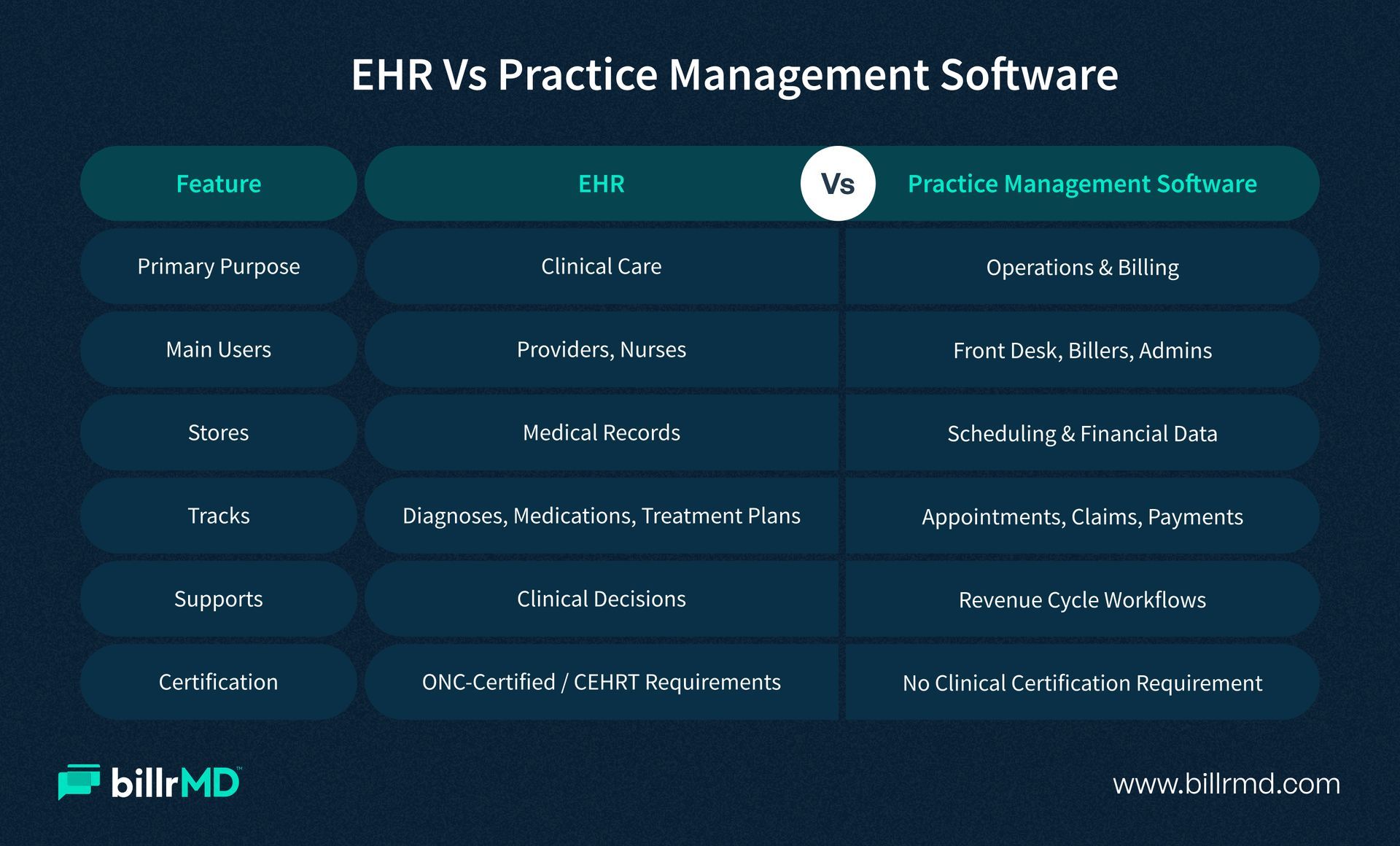
The clearest way to understand the difference between EHR and practice management software is to look at what each system is fundamentally built to do, and who it's built to serve.
Primary Purpose
A PMS manages the operational and financial lifecycle of a practice visit: scheduling, eligibility verification, billing, and collections. An EHR manages the clinical lifecycle: documenting what happened during the visit and maintaining a patient's longitudinal health record.
Primary Users
Front desk staff, billing specialists, and practice administrators drive the PMS. Clinicians and clinical support staff drive the EHR.
Data Types
PMS data is administrative and financial: appointment records, insurance information, claim status, payment history, and revenue reports. EHR data is clinical: diagnoses, medications, lab values, imaging results, clinical notes, and care plans.
Revenue Cycle Connection
This is where the two systems overlap most significantly. When a provider completes a clinical encounter in the EHR, that visit needs to translate into a billable claim. If EHR and practice management software platforms don't communicate cleanly, billing teams end up transferring clinical data manually, which slows the revenue cycle and increases the risk of coding errors. Tight integration between the two makes the handoff accurate and fast.
Regulatory Scope
Certified EHR Technology (CEHRT) is required for participation in certain CMS programs, including Promoting Interoperability and other quality reporting initiatives. Practice management systems that store or process protected health information (PHI) must comply with HIPAA privacy and security requirements
Understanding EHR and practice management software as complementary systems rather than competing ones is the key shift in perspective. They solve different problems. The question of whether your practice needs one, the other, or both depends on your workflows, your team structure, and whether your clinical documentation requirements call for a dedicated EHR.
Who Uses PMS and Why?
Practice management software (PMS) is essential for managing administrative and billing workflows across various healthcare organizations. Independent medical practices, particularly solo providers and small groups, benefit significantly from PMS, as it streamlines processes by addressing eligibility issues, scrubbing claims for errors, automating payments, and generating financial reports.
Billing companies also depend on PMS to efficiently handle high volumes of claims across diverse payer mixes, with a focus on billing accuracy and denial management rather than clinical documentation. Moreover, multi-specialty group practices and expanding organizations gain from PMS by consolidating financial visibility across providers and locations, enabling comprehensive analysis of denial trends, A/R aging, and overall collection performance from a single platform.
Labs and independent diagnostic testing facilities (IDTFs) utilize PMS tailored to their unique billing needs, allowing them to manage their operations effectively without the need for separate systems.
Why Integration Between EHR and PMS Matters
The choice between EHR and practice management software isn't always clear-cut; most medical practices use both. A strong integration between them enhances billing accuracy and cash flow. When EHR and PMS are well-connected, clinical documentation flows directly into billing, eliminating the need for re-entering diagnosis and procedure codes, thereby speeding up claims submission and reducing errors.
In contrast, poor integration forces staff to manually transfer information, leading to missed codes, dropped modifiers, and denied claims, resulting in inefficiencies and lost revenue. billrMD addresses these issues by fostering seamless connections with existing clinical tools, ensuring smooth data transfer, and reducing manual workloads for billing teams.
Why billrMD?
billrMD is a web-based practice management and medical billing platform designed for modern healthcare practices, with no installations or server maintenance required. It operates securely through any web browser, enabling remote access.
Key features include a claim scrubbing engine that checks submissions against over 73,000 codes, resulting in up to a 99% first-pass acceptance rate. It also offers real-time eligibility verification, automated payment posting, and consolidated reporting tools for denial trends, A/R aging, payer performance, and collection rates. All of this is accessible from a single dashboard. billrMD supports both in-house and external billing operations, making it ideal for independent practices, billing companies, labs, and IDTFs, adapting to their growth and operational needs.
Conclusion
EHR and practice management software are two distinct tools that serve two distinct functions. EHRs support clinical care. Practice management software supports the operational and financial side of running a practice. Knowing the difference lets you evaluate systems with clarity, build a tech stack that actually matches your team's workflow, and stop paying for features that don't address your actual problem.
Most practices use both, but the integration between them determines how smoothly the billing process runs. When clinical data flows cleanly into billing without manual re-entry, claims go out faster, errors go down, and your team's time goes toward higher-value work. The right PMS is the foundation of that workflow, and it's worth choosing one that's built to grow with you.
One Smart Solution for PMS & Billing
Frequently Asked Questions
Is an EHR the same as a practice management system?
No. An EHR captures clinical data: medical history, diagnoses, treatment plans, medications, and lab results. A practice management system handles the administrative and financial side: scheduling, billing, claims submission, and reporting. Many practices use both, and a clean integration between them is important for an efficient revenue cycle.
Do I need both an EHR and practice management software?
It depends on your practice type. If your team documents clinical encounters electronically, you'll need an EHR. If you're managing scheduling, billing, and insurance claims, you need a PMS. Most full-service medical practices use both. Billing companies, labs, and IDTFs often operate on practice management software alone without a clinical EHR component.
What is the difference between EHR and practice management software when it comes to billing?
EHRs generate the clinical documentation that billing is based on. Practice management software handles the actual billing workflow: claim creation, submission, denial management, payment posting, and collections. When the two systems are integrated, clinical data flows directly into the billing process. When they're not, that transfer becomes a manual step that introduces errors and delays.
Can practice management software work without an EHR?
Yes. Billing companies, labs, and IDTFs often operate entirely on PMS platforms without a clinical EHR. In these environments, providers may use a separate clinical tool or paper documentation, and the PMS handles all billing and administrative functions independently.
Recent Posts