The Medical Billing KPI Guide: What to Track, Target, and Fix

How long does your practice wait to get paid? What share of claims does a payer pay on the first try? If those answers take a spreadsheet and an hour, your KPIs in medical billing need attention.
The gap between activity and income is where medical billing KPIs earn their place. A few well-chosen numbers show where revenue slows, which payer causes trouble, and which habit costs you money.
This guide covers eight KPIs for medical billing, with formulas, working targets, and fixes for each. You'll also learn how to review them, which mistakes skew results, and how billrMD keeps the data in one place.
Your Billing KPIs in One View
Why Medical Billing KPIs Matter for Your Practice
Revenue problems rarely announce themselves. They show up as a slow month, a pile of unworked denials, or a physician asking why collections dipped.
KPIs in medical billing turn those vague worries into numbers you can act on. They show whether claims leave clean, payers pay on time, and you collect what you're owed.
Navigating payer relationships is becoming more challenging. In a survey of 1,000 physicians, 74% said prior authorization denials have increased over the past five years. Tracking the right numbers helps you spot billing issues early.
Good KPIs also settle debates. When a physician asks why cash is tight, you can point to a specific number, payer, or workflow instead of a hunch.
8 Essential Medical Billing KPIs to Track
Start with these eight. The targets are common working goals, not guarantees, because specialty, payer mix, and claim complexity all shift them.
| Metric | Formula / Definition | Target |
|---|---|---|
| Clean claim rate | Clean claims ÷ claims submitted | 95% or higher |
| First-pass resolution rate | Claims resolved on first submission ÷ claims submitted | 95% or higher |
| Initial denial rate | Claims denied on first review ÷ claims adjudicated | Under 5% |
| Days in A/R | Total A/R ÷ average daily charges | 30 to 45 days |
| A/R over 90 days | A/R older than 90 days ÷ total A/R | Under 15% |
| Net collection rate | Payments ÷ collectible charges after adjustments | 95% or higher |
| Charge lag | Charge posting date minus date of service | 3 days or less |
| Patient collection rate | Patient payments ÷ patient balances due | Track by policy and trend |
1. Clean Claim Rate
This is the share of claims that pass required edits without manual intervention. It's your first quality check. A dip here usually points to registration errors, missing modifiers, or wrong payer IDs. Sort rejections by reason, not just count, because ten eligibility errors need a different fix than ten coding errors. billrMD's
electronic claims submission flags errors with real-time claim scrubbing before claims go out.
2. First-Pass Resolution Rate
A claim can be accepted and still stall. First-pass resolution rate counts claims paid or settled after a single submission, with no rework. Compare it with your clean claim rate. A wide gap means claims clear the front door but fail at the payer's review. Track it by payer to see who slows you down.
3. Initial Denial Rate
This measures claims a payer denies on first review, so it shows revenue at risk before any appeal starts. A report states that 11.65% of all healthcare claims were denied on first pass in 2025. Because this is an industry-wide figure rather than a physician-practice benchmark, use it as a reference point and track your own rate by payer, service, and denial code. A blended rate can hide one payer or service line generating a disproportionate share of denials.
billrMD's
reports and analytics include a denials analysis tool that pinpoints the services and codes behind denials.
4. Days in A/R
Days in A/R shows how long it takes to collect after you bill. Many physician practices target roughly 30 to 45 days. More than 90 days is a red flag that the revenue cycle needs attention. The total alone can mislead, so split it by payer and aging bucket. One slow payer can drag the whole number up. billrMD's
claim aging report organizes unpaid claims by client or payer, which makes that split easy.
5. A/R Over 90 Days
Old balances are hard to collect. Track the share of A/R older than 90 days, and watch its direction month to month. A steady total can hide worsening aging. Rising numbers usually mean unworked denials or thin follow-up. Set a rule so no claim sits untouched for 30 days.
6. Net Collection Rate
Net collection rate shows how much of the money you were entitled to collect actually arrived. Use charges after contractual adjustments, not gross charges, or payer mix will distort the result. A rate below 95% often signals underpayments, missed appeals, or avoidable write-offs. billrMD's
electronic remittance advice feature posts payments and adjustments to the right accounts and cross-checks remittances against submitted claims, so discrepancies surface faster.
7. Charge Lag
Charge lag is the time between the date of service and charge posting. Every extra day delays cash and shortens the window before payer filing deadlines. Run it by the provider. Unsigned notes and late charge entry are common culprits. Set an internal target for timely charge posting and monitor it by provider.
8. Patient Collection Rate
Patient balances behave differently from insurance balances, so they need their own KPI. Compare what you collect at check-in with what you collect after statements go out. The gap shows whether your estimates and payment options work. billrMD's patient invoicing and billing tools send secure payment links by email or text and automatically apply payments to the statement.
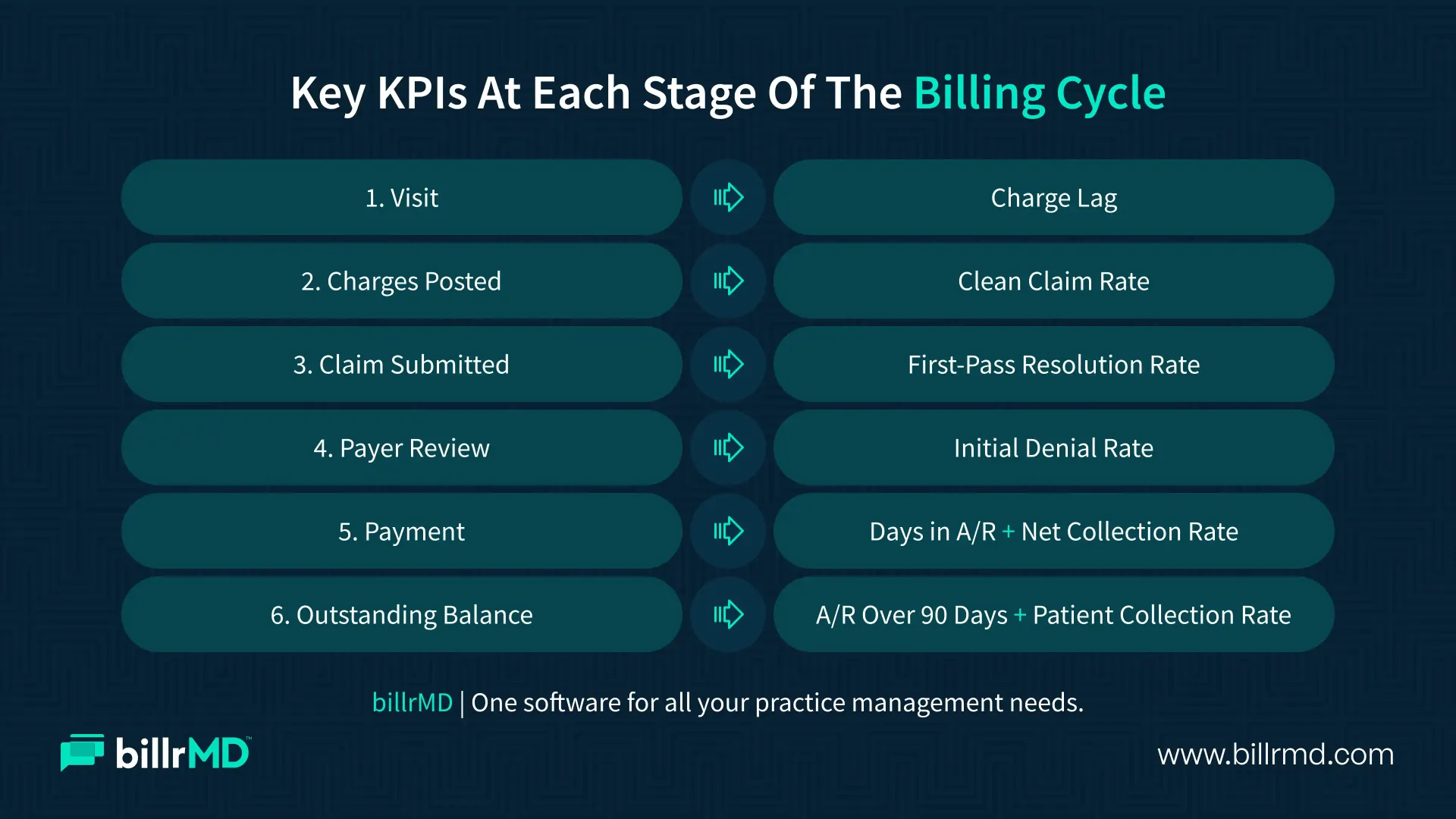
How to Analyze and Improve Your Billing Performance
Numbers only help when someone acts on them. Use this simple routine.
- Set a cadence: Review charge lag, rejections, and new denials weekly. Review days in A/R, aging, and net collection rate often.
- Segment every result: Break each KPI down by payer, provider, and location. The pattern points to the cause.
- Trace a sample: Pull five accounts from the weakest segment and find where the process first broke.
- Assign one fix: Name an owner, a due date, and the KPI you expect to move. Several fixes at once make results hard to read.
- Measure the next batch: Check whether newly submitted claims improved, not just the old backlog.
billrMD's built-in reports cover claim aging, balances, and payments, plus custom reports with advanced filtering. You can pull the same views each month without rebuilding a spreadsheet.
Common Mistakes When Tracking Medical Billing KPIs
Even good data misleads when the process around it is loose. Watch for these slip-ups.
- Watching totals only: A blended rate hides the payer, provider, or code causing the damage.
- Mixing definitions: If you measure denial rate by claim count one month and by dollars the next, the trend means nothing.
- Ignoring the front end: An article notes that denials and payment delays often originate at registration, where incorrect demographic and insurance information can create downstream problems.
- Reviewing too rarely: Month-end reviews can catch problems a month late. Watch fast-moving numbers like rejections weekly.
- Tracking without acting: A KPI with no owner is just a report. Assign each one to a named person with a scheduled follow-up.
How billrMD Helps You Track KPIs in Medical Billing
billrMD puts claims, payments, and the reports behind your medical billing KPIs in one web-based platform. Real-time claim scrubbing catches errors before submission. Claim aging and payment reports show where money is stuck, and custom reports let you filter data the way your team reviews it. The denials analysis tool points to the services and codes behind denials. Medical practices, billing companies, and labs can start with a free account, no credit card required.
Conclusion
Meaningful medical billing KPIs don't need a giant dashboard. Start with the eight above, assign an owner to each, and review them on a steady schedule. Small trends show up early, and early problems cost less to fix. This week, pick the two numbers that worry you most, break them down by payer, and fix the weakest link first. If you need further assistance or specifics, we’re always a phone call away.
Track Your KPIs
Frequently Asked Questions
What are the most important KPIs in medical billing?
The clean claim rate, initial denial rate, days in A/R, net collection rate, and A/R over 90 days. Together, they show claim quality, payer behavior, payment speed, and collectability.
What is a good clean claim rate?
Many practices aim for 95% or higher. Confirm what your system counts as clean, and compare results by payer, because definitions and workflows vary.
How is clean claim rate different from first-pass resolution rate?
Clean claim rate shows whether the payer accepts a claim for processing. First-pass resolution shows whether it gets paid or settled without rework.
Do small practices need the same KPIs for medical billing as larger groups?
Yes. A small practice can begin with five core measures and one monthly review, then add payer and provider breakdowns as volume grows.
Recent Posts