Medical Billing Software for Front Desk Teams: Features That Reduce Errors and Speed Up Check-In

Front-desk staff capture or confirm the patient and insurance details that billing relies on, including names, dates of birth, member IDs, and coverage information. Incorrect or outdated details can cause claim rejections or payment delays.
Scheduling and eligibility tools can help staff find coverage or registration issues before the visit, when there is still time to address them. This guide covers the features that matter, the KPIs they move, and what to check before you choose.
Try billrMD for Free
Why Front Desk Errors Hurt Your Billing Results
Incorrect coverage information can also generate follow-up calls when patients receive unexpected balances, adding work for both front-desk and billing staff.
Manual eligibility checks can mean switching between multiple payer portals. A poll found that staff at 61% of medical practices accessed at least seven payer portals each week. Respondents most often cited eligibility checks and prior authorizations as reasons for using those portals. The poll received 252 applicable responses.
Front desk errors usually start in four places:
- Registration: misspelled names, wrong birth dates, outdated insurance cards.
- Eligibility: coverage checked late, or not at all.
- Scheduling: wrong visit type, no reminder, no confirmation.
- Payments: balances left uncollected while the patient is still in the office.
Software can help staff catch registration and coverage issues earlier, but it cannot prevent every denial or missed payment.
Key Features of Medical Billing Software for Front Desk Teams
Focus on features that help staff verify insurance, manage check-in, and collect patient balances. A few of those features are listed below:
Scheduling with live eligibility
billrMD’s
scheduling module lets staff check live insurance eligibility while they book. One click on Check Eligibility sends a request to the clearinghouse, and a response returns within moments. Coverage problems surface before the visit. Staff can also book a slot without creating a new patient record first, which helps on busy phone days.
Eligibility history in one place
Every eligibility request is stored and sorted by status. Staff can see when coverage changed instead of asking the patient the same questions twice.
Check-in and check-out
The Check-In/Check-Out module uses a clean layout that keeps patients from waiting. It shares a platform with scheduling and billing, so staff just confirm details instead of retyping them.
Automated appointment reminders
Reminders go out by email or text from inside the scheduler. Staff spend less time on confirmation calls, and patients get a nudge before the visit.
Patient invoicing and card payments
Patient invoicing offers balance or ledger statements with your practice logo. Card processing runs through billrMD’s processing partners, posts payments to the patient’s account, and stores card details securely.
User accounts and permissions
User accounts and role-based permissions let practices control which staff members can access specific information and functions. This helps limit unnecessary access to PHI.
How Front Desk Automation Improves Billing KPIs
Track these measures to see whether changes to your front-desk workflow are improving practice operations. Our medical billing
KPI guide explains how to calculate each one. Here is where the front desk makes the biggest difference.
- Clean claim rate: Accurate registration and current insurance details help prevent front-end errors. Coding, documentation, and payer edits also affect this measure.
- Eligibility-related rejections and denials: Track eligibility-related claim rejections separately from payer denials. Check coverage during scheduling and again close to the visit, since coverage can change.
- Days in A/R: Accurate registration and eligibility information can prevent avoidable claim rejections and rework. However, payer processing times and billing follow-up also affect Days in A/R.
- No-show rate: A poll found that 32% of medical groups saw higher no-show rates than in 2025. Reminders help, but cost and transport also drive missed visits, so review your own causes.
- Point-of-service collections: A report shows practices collect about 72% of copays at the visit but only 26.83% of patient-due balances. Another report found that 62% of consumers prefer to pay medical bills online, and only 22% always know what they owe beforehand. Showing the balance at check-in and offering card payment closes part of that gap.
- Check-in time: Measure the time from patient arrival to completion of check-in. Arrival-to-rooming time also depends on clinical staff and room availability, so it is not purely a front-desk measure.
Pick two or three of these KPIs. Record a baseline before you switch systems, then compare after 90 days.
What to Look for in Front Desk Billing Software
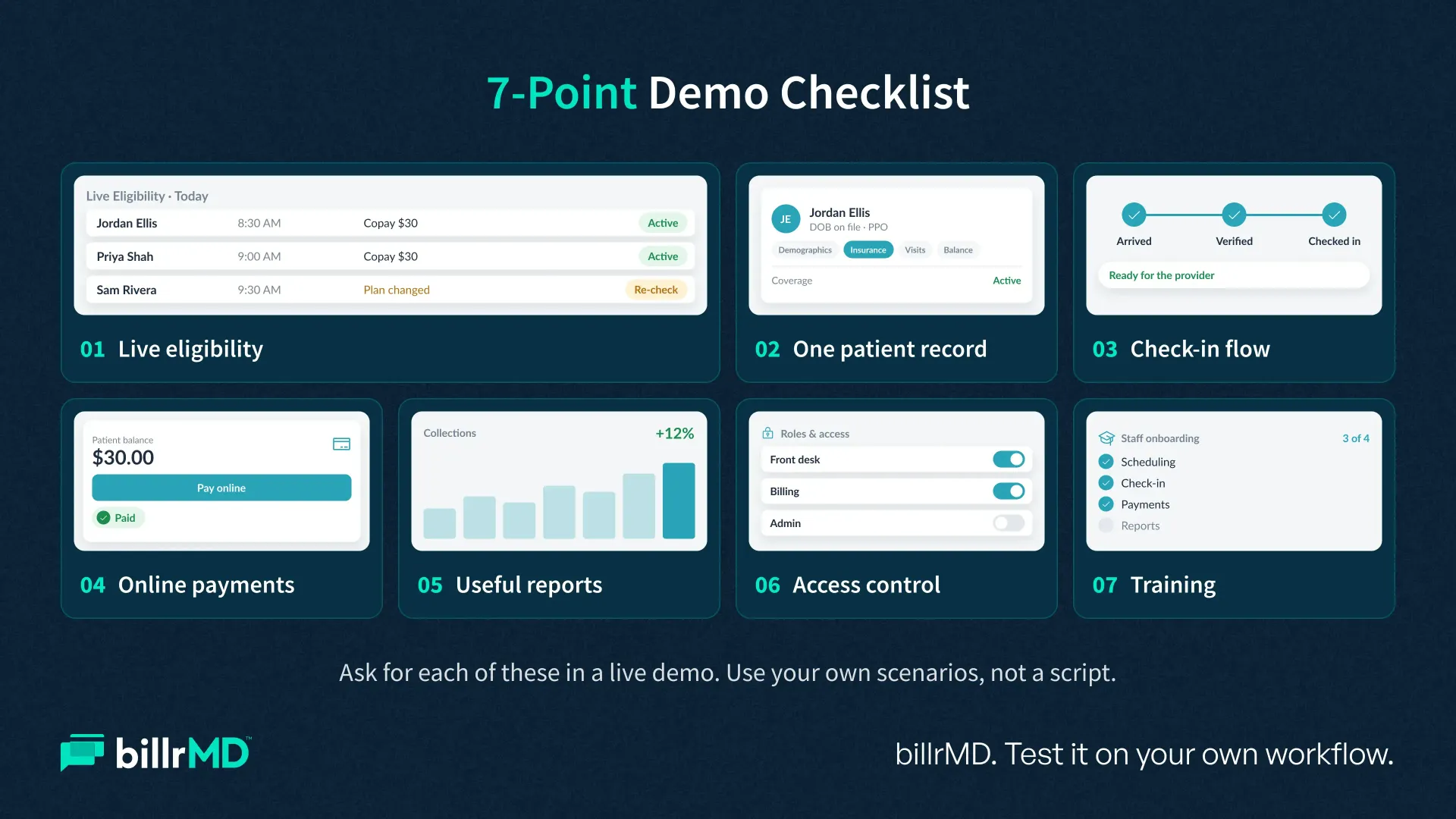
When you shop for medical billing software for front desk team workflows, use this checklist as a demo script. For the wider buying process, read our
guide on how to choose medical billing software.
- Eligibility inside the scheduler. Ask the vendor to run a live check during the demo, not a recorded one.
- One patient record. If staff re-enter data between scheduling, billing, and payments, errors return.
- Check-in that matches your flow. Test a new patient, a returning patient, and a self-pay visit.
- Payment tools at the desk. Look for statements, card processing, and automatic posting to the account.
- Reports your team can act on. Look for reports that break down collections, appointment activity, and denials by reason. billrMD offers customizable reports and denial analysis tools.
- Access control and cloud access. Look for role-based permissions, access logs, appropriate safeguards for PHI, and a web-based platform that requires no downloads. Ask how the vendor supports HIPAA compliance.
- Training and support. New staff need short lessons they can replay.
Test each function using your own new-patient, returning-patient, and self-pay workflows.
How billrMD Supports Front-Desk Workflows
billrMD brings scheduling, eligibility checks, check-in and check-out, reminders, invoicing, card processing, claims, and ERA into one web-based medical billing platform. Staff logs in from any internet-connected device. HIPAA-compliant security and daily backups are included.
Behind the product are more than 25 years of healthcare technology experience. Practices that want to test the workflow can start with a free introductory plan. No credit card is required.
Conclusion
Accurate registration, early eligibility checks, and clear patient balances can prevent avoidable front-end problems. Use the checklist to evaluate how a system handles these tasks, then track your practice's results after implementation. If you need insight tied to your workflow, we’re just a phone call away.
See billrMD's Front-Desk Workflow
Frequently Asked Questions
What is the best medical billing software for a front desk team?
The best fit checks eligibility during scheduling, handles check-in and payments in one record, and reports on front-desk KPIs. billrMD offers all three in a single web-based system.
What features should front desk billing software include?
Look for scheduling with live eligibility, check-in and check-out, automated reminders, patient invoicing, card processing, and user permissions. Each one removes a manual step where errors start.
How does front desk automation reduce claim denials?
It moves verification earlier. Staff confirms coverage while booking, so inactive or changed plans are caught before the visit. Cleaner registration data also means fewer claims fail at the clearinghouse.
Can billing software speed up patient check-in?
Yes, when scheduling, eligibility history and payments share one record. Staff verify before the visit, so check-in becomes a confirmation step instead of data entry.
Recent Posts