What Does Medical Billing Software Really Cost in 2026?

Managing the financial side of a healthcare practice is often as complex as the clinical side. As we move into 2026, with national health spending projected to reach nearly $7.7 trillion by 2032, the shift toward automation and integrated platforms has made selecting the right technology more critical than ever. However, for most practice owners and administrators, the primary hurdle remains the same: understanding the actual Medical Billing Software Cost.
Medical practices vary enormously in size, specialty, and workflow complexity, and billing software pricing reflects that. But the lack of transparency makes it easy to underestimate what you're actually signing up for, or to choose a cheaper plan that ends up costing you more in the long run due to denied claims, manual workarounds, and lost productivity.
This guide cuts through that. We'll walk through the most common medical billing software pricing models, the factors that shape what you'll pay, what to watch for in the fine print, and how billrMD's
medical billing solutions stack up when you look at the full picture.
Billing Efficiency In Action
How Much Does Medical Billing Software Cost?
There's no straight answer, but there are four main pricing models used across the industry. Understanding each one makes it much easier to compare options on equal footing.
Per-Provider Subscription
This is by far the most common structure. You pay a monthly fee for each licensed provider at your practice. Rates typically range from $100 to $500 per provider per month, which is the standard benchmark for the cost of medical billing software in today’s market
Percentage of Collections
Instead of a flat monthly fee, some vendors take a cut of your monthly revenue, usually between 4% and 9%. On paper, this feels low-risk because your cost rises and falls with your collections. In practice, high-volume practices can end up paying far more than they would under a subscription model, and the unpredictability makes it difficult to forecast your exact Medical Billing Software Cost from month to month.
Flat Monthly Fee
A fixed monthly rate regardless of how many providers you have. This works well for solo practitioners or small practices with stable headcount. Flat-fee plans often run $50 to $300 per month, though feature depth tends to be limited at the lower end of that range.
Per-Claim Pricing
Some platforms offer per-claim pricing, typically ranging from $0.25 to $2.00. This model provides great flexibility for smaller or fluctuating practices. It allows Medical billing software costs to scale naturally as your business grows. Compare your monthly claim volume against flat subscription rates to find the most efficient path forward.
Beyond the base rate, many vendors charge separately for setup, data migration, training, and premium modules. Always ask for a complete cost breakdown, not just the headline subscription price.
Factors That Influence the Cost of Medical Billing Software
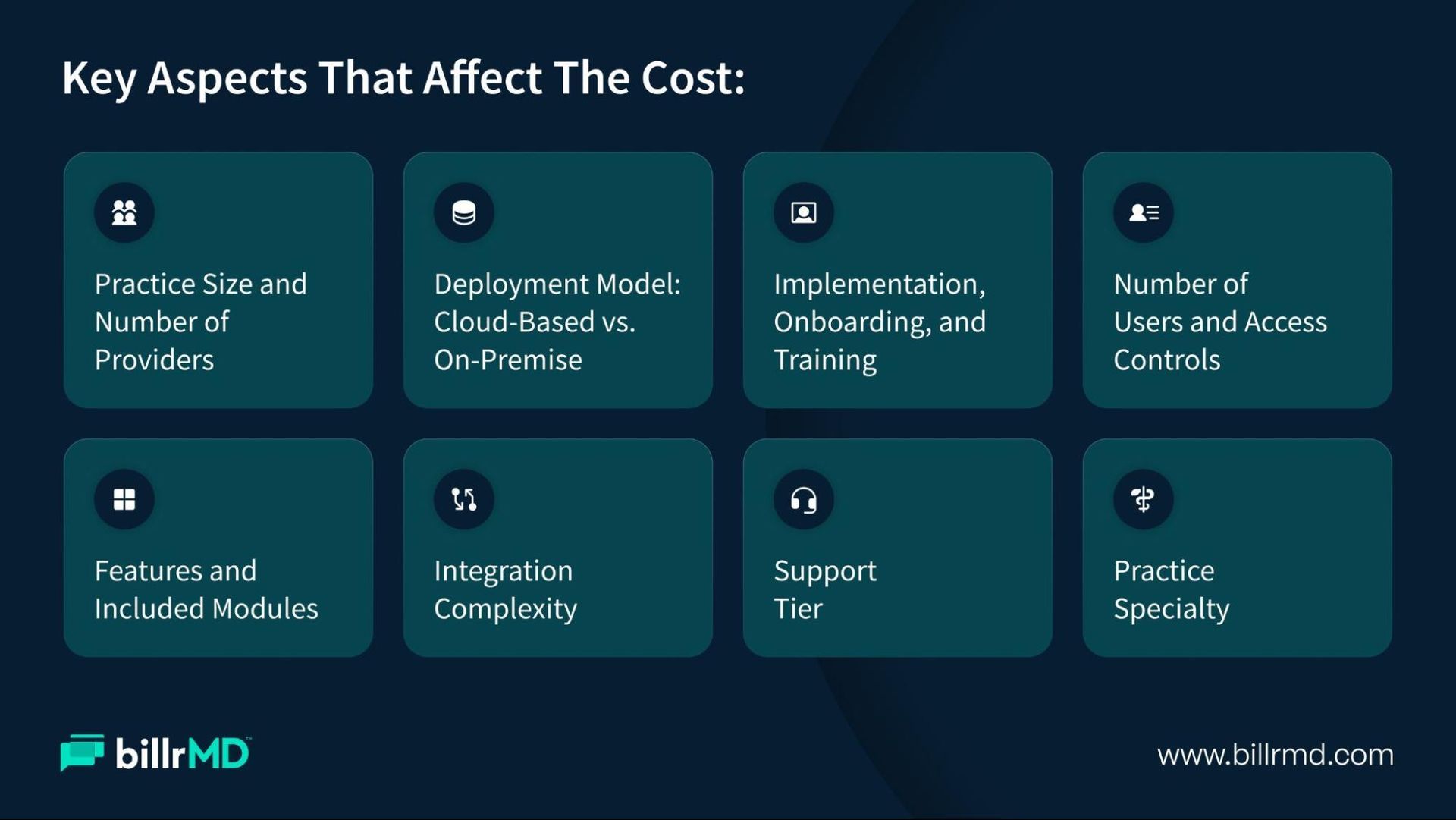
Knowing the pricing model is step one. What actually determines where your practice lands within that range comes down to several variables, some obvious, others easy to overlook until after you've committed.
1. Practice Size and Number of Providers
Per-provider pricing means a solo practitioner pays a fraction of what a ten-provider group does. That's simple enough. What's worth noting is how these costs compound as you grow. If you're planning to add providers in the next year or two, it's worth understanding exactly how your software costs will scale and whether volume discounts apply.
2. Deployment Model: Cloud-Based vs. On-Premise
Cloud-based and web-based platforms tend to have lower upfront costs because you're not purchasing server hardware or paying for dedicated IT maintenance. On-premise systems often come with a significant initial investment and ongoing infrastructure overhead, so the total cost of ownership over three to five years is usually much higher.
In 2026, the shift toward web-based medical billing solutions has accelerated for exactly this reason. Accessibility, automatic updates, and no hardware headaches make cloud deployment the default choice for most modern practices.
3. Features and Included Modules
Basic plans cover the essentials: claim submission, scheduling, and simple reporting. More advanced tiers unlock real-time insurance eligibility verification, electronic remittance advice (ERA) processing, detailed billing analytics and revenue cycle reporting, denial management, patient portals, and communication tools like text-to-pay and digital fax.
Each additional module typically comes at a cost, either baked into a higher tier or as an add-on. The question worth asking: Do these features generate enough time savings and revenue recovery to justify the price difference? For most growing practices, the answer is yes.
4. Number of Users and Access Controls
Some plans cap the number of users at a given price point, which matters a lot if your front desk staff, billing team, and administrators all need access. Hitting a user limit mid-growth can force an upgrade that wasn't in your budget. Look closely at what counts as a "provider user" versus a "non-provider user" and whether the plan you're evaluating covers your full team.
5. Integration Complexity
If you're running a separate EHR system, you'll want your billing software to connect with it. Integration costs vary, but ensuring your EHR and billing platform sync perfectly is a vital component of modern medical billing solutions. Some vendors offer pre-built connections at no extra charge; others charge one-time setup fees or require custom API work. If integration is a priority for your practice, ask specifically about it before signing.
6. Implementation, Onboarding, and Training
Many advertised prices exclude implementation. Data migration, staff training, and system configuration can add several hundred to several thousand dollars, depending on practice size and your existing setup. Some vendors include an implementation package at certain plan levels, which can significantly reduce the real cost of medical billing software during your first year of use.
7. Support Tier
Responsive support sounds standard until you discover that 24/7 availability is only included at the highest tier. Before committing, find out exactly what support looks like at your plan level and whether there are limits on support availability.
8. Practice Specialty
Behavioral health, labs, independent diagnostic testing facilities (IDTFs), and other specialty practices often require niche billing codes, compliance features, or workflow configurations that aren't part of a standard plan. Specialty-specific functionality may carry premium pricing or may not be available below a certain tier entirely.
Hidden Costs Worth Investigating
The cost of medical billing software is rarely just the monthly invoice. A few line items that often catch practices off guard:
- Setup and implementation fees:
Billed once, but substantial, especially for larger practices - Data migration charges:
When moving records from a legacy system - Per-message fees:
For SMS reminders, text-to-pay statements, or digital fax pages beyond the included limit - Clearinghouse fees:
Charged per claim on top of the subscription, at some vendors - Annual contract lock-ins:
With early termination penalties - Forced upgrades:
When a critical feature you need only exists at the next tier
None of these is an inherent dealbreaker. But walking into a contract without knowing they exist is how a $149/month plan quietly becomes $300/month in practice.
billrMD: Medical Billing Solutions Built for Transparency and Scale
If you're comparing options and looking for a platform where the pricing is clear and the features are genuinely built around how practices operate, billrMD is worth a close look.
billrMD is a web-based medical billing and practice management platform with over 25 years of experience in healthcare technology. It's designed to handle the full billing cycle, from insurance eligibility verification and electronic claims submission through ERA processing, patient invoicing, and payment posting. With over 73,000 billing codes across ICD-10, CPT, and DSM-5, it covers a wide range of specialties without requiring custom add-ons for common code sets.
At billrMD, we proudly offer a completely free plan that includes 1 user, a scheduler, basic reporting, and 25 GB of cloud storage. Practices can easily start with this no-cost option and later choose to upgrade to our other available plans for enhanced features and capabilities.
Basic: $149 per provider per month
Supports up to three users. Includes the scheduler, basic reports, AMA CPT License access, training resources, and 25 GB cloud storage. A practical entry point for small practices managing billing in-house.
Growth: $199 per provider per month
billrMD's most popular tier. Unlocks unlimited non-provider users, premium reports, AMA CPT License and ICD-10 code updates, a robust scheduler, authorization and referral tracking, patient statements, task management, an implementation package, demographic data conversion, 50 GB cloud storage, and 24/7 unlimited support. This is the tier where most growing practices find the right balance of capability and cost.
Premium: $249 per provider per month
Everything in Growth, plus a patient portal, appointment reminders, email and text communication (500 texts included), digital fax (400 pages),
Text-to-Pay patient statements (500 included), and unlimited Email-to-Pay patient statements.
billrMD also boasts a 99% first-pass acceptance rate, which directly reduces the cost of rework and resubmission. Fewer denials means fewer billing cycles before you get paid, and that compounds over time into meaningful revenue recovery. The platform is HIPAA-compliant, with military-grade encryption and built-in daily backups, so data security doesn't require a separate investment.
Conclusion
The cost of medical billing software is rarely as simple as a monthly rate. What you pay is shaped by your pricing model, your practice size, the features you actually need, and how much of the real cost you're accounting for upfront. The practices that get the most value from their billing software aren't necessarily the ones spending the least per month. They're the ones whose software is reducing claim denials, shortening payment cycles, and genuinely freeing their staff from manual work.
A platform that costs a bit more per month but delivers a 99% first-pass acceptance rate and real-time revenue visibility will almost always outperform a cheaper option that creates more administrative friction than it removes. The goal is the highest return on your investment, ensuring you choose medical billing solutions that offer the most value rather than just the lowest invoice
If you're ready to see what a capable, transparent billing platform looks like in practice, billrMD offers a free plan with no credit card required. Start there and scale when you're ready.
Try billrMD for Free
Frequently Asked Questions
What is the difference between cloud-based and on-premise billing software in terms of cost?
Cloud-based platforms like billrMD have lower upfront costs because there's no server hardware to purchase or maintain. On-premise systems entail a higher initial investment and ongoing IT overhead, typically making the total cost of ownership significantly higher over a three-to-five-year period. Most modern practices are choosing web-based systems for this reason.
Are there hidden fees I should ask about before signing up?
Yes. Common ones include setup and implementation fees, data migration charges, per-message fees for SMS or fax communication, clearinghouse fees charged per claim, and early termination penalties in annual contracts. Always request a complete cost breakdown, not just the base subscription rate.
Do small or solo practices need to pay for enterprise-level billing software?
No. Platforms like billrMD are designed to scale with practice size, offering a functional free plan and entry-level tiers that cover core billing needs without enterprise-level pricing.
Is it worth paying more for software that includes analytics and reporting?
For most practices, yes. Revenue cycle visibility, denial tracking, and financial reporting directly support faster collections and better decisions. The value from those features typically outpaces the additional cost within a few billing cycles.
Can medical billing software work for specialty practices?
Most platforms support a range of specialties, but depth varies. billrMD includes over 73,000 billing codes across ICD-10, CPT, and DSM-5, which covers the needs of most specialty practices, including behavioral health, labs, and IDTFs, without requiring separate code library purchases.
Recent Posts